1Connect
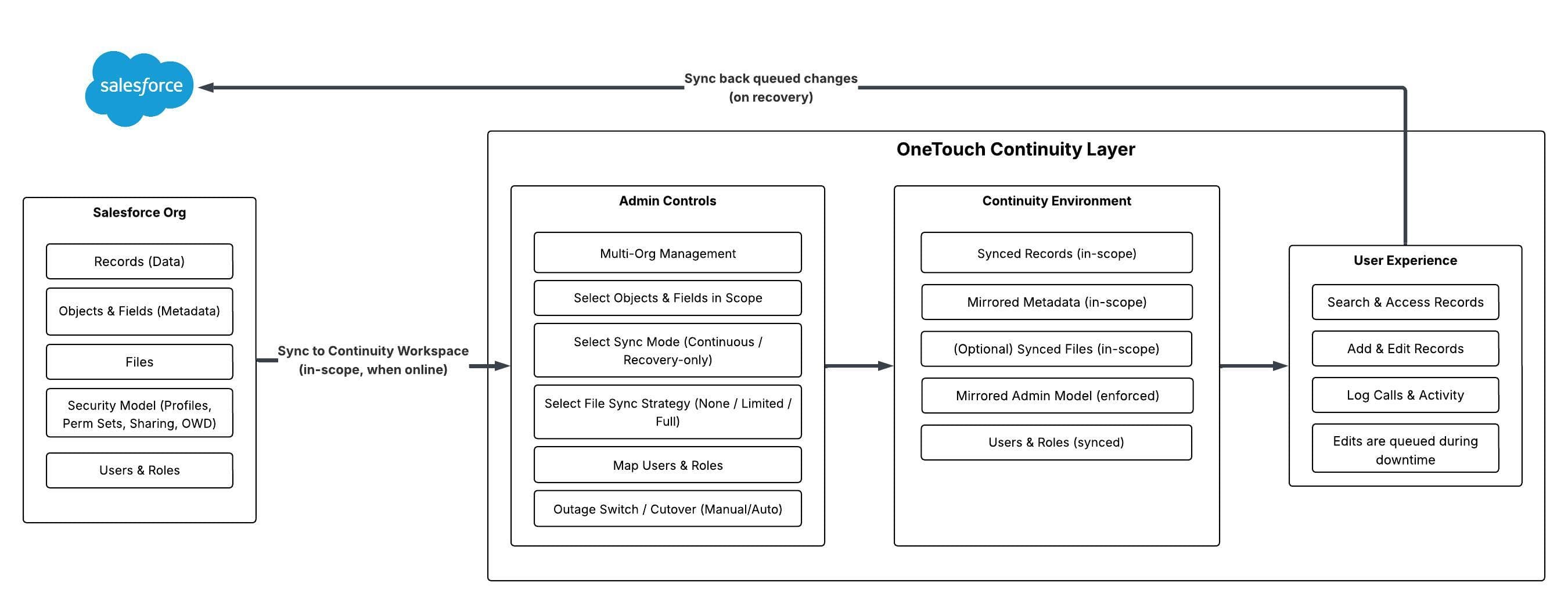
Secure OAuth connection discovers the objects, fields, users, and access model you want covered for continuity. You choose what objects/workflows are covered for continuity.
Join Early AccessA hot-swap continuity workspace for Salesforce — keep selling and supporting during downtime, then sync changes back automatically.
Launching 2026. Building our founding community now.
2.5-minute walkthrough: the OneTouch CRM experience during downtime
Salesforce downtime isn’t always a headline-making incident. Sometimes it’s a bad deployment, an auth/login disruption, a regional degradation, or a connectivity policy change.
When Salesforce is unreliable, Sales, Service, and RevOps lose the ability to execute the work that keeps pipeline moving and customers supported.
Every hour of disruption creates backlog, delays follow-ups, breaks reporting accuracy—and risks pipeline slippage.
Downtime doesn’t just pause productivity — it adds backlog, creates reporting gaps, and forces teams into spreadsheets and Slack messages.
Disruption creates revenue leakage: stalled follow-ups, delayed quotes, missed renewals, and reporting blind spots.”
Revenue teams need a continuity workspace that works during downtime and syncs back when Salesforce is available again.
Salesforce stays the system of record. OneTouch keeps teams productive when Salesforce is unavailable.
OneTouch is a Salesforce continuity workspace that keeps Sales, Service, and RevOps teams operational during downtime.
We do this by mirroring your Salesforce CRM experience into a hot-swap continuity workspace that runs on infrastructure separate from Salesforce — with options to keep data synced so your workspace is ready when you need it.
OneTouch is designed to complement Salesforce (your system of record), not compete with it.
During downtime, teams keep working in OneTouch. When Salesforce returns, queued changes can be reconciled and synced back so your system of record stays intact.
Not a migration. Not just a backup. Continuity you can operate.
Here’s what teams can keep doing during downtime:
Want to see the end-to-end continuity flow for your org? Join early access.
Secure OAuth connection discovers the objects, fields, users, and access model you want covered for continuity. You choose what objects/workflows are covered for continuity.
Join Early AccessOneTouch generates a continuity workspace that mirrors the navigation and record experience your teams already know.
Choose sync options to keep the workspace current. During downtime, changes are queued safely.
When Salesforce is available again, OneTouch syncs queued changes back so your system of record stays intact.
Drop your work email and we’ll follow up to schedule a quick CRM continuity readiness check and share pilot details.
Want to see it live? Contact us.